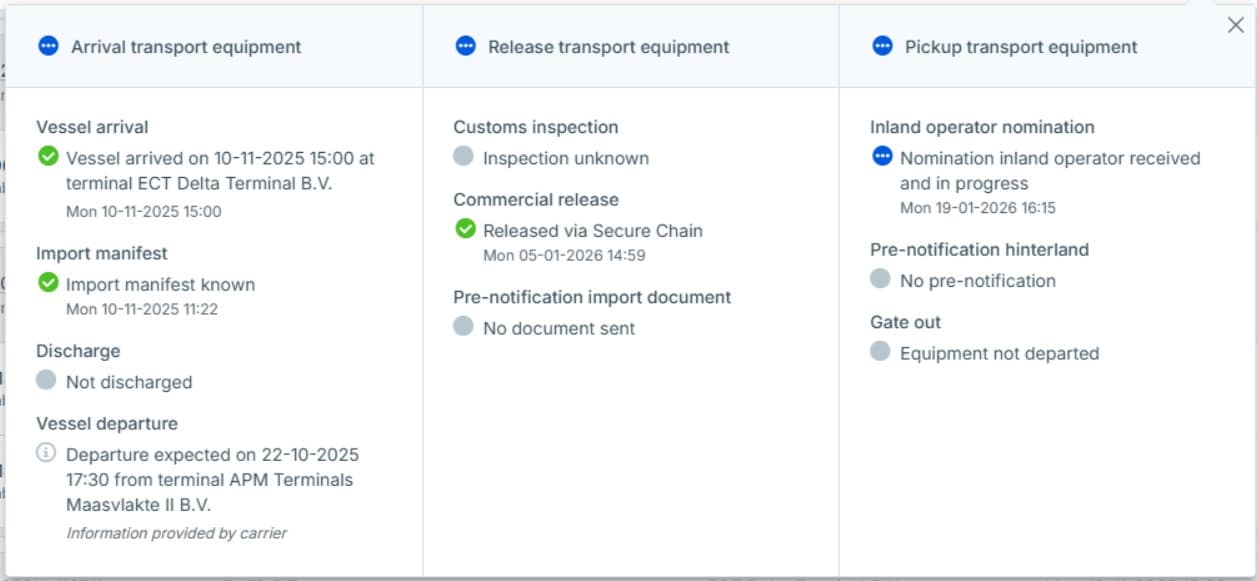


Since the launch of the Secure Chain, we have been working on improving the exemption process. This is executed in consultation with the port community. Since January 20, 2026, a second long-awaited update has been available in Cargo Controller and Cargo Release Manager: extra more detailed nomination statuses. Both services provide more information about the nomination status.
What is new?
Previously, the nomination turned green when it was submitted. The status had two updates: gray (not nominated) or green (nominated). We noticed that this process was not transparent enough. The status in Hinterland Container Notification can differ from the status in Cargo Controller and Cargo Release Manager.
The following status options are displayed in the service (3rd column, the first status):
 The nomination is not yet known (gray)
 The nomination has been sent, but the terminal has not yet confirmed it (blue)
 The nomination has been accepted (green)
The withdrawal of the nomination is rejected (stays green)
Withdrawing and/or changing the status of (un)confirmed nominations
The insights below are directly linked to the B/L timeline (see ‘Details’). The process has two control questions:
- Can the nomination be changed?
- If so, has the change been confirmed?
The timeline displays all status updates. The container status screen displays the current status, and the explanations for the security questions are included in the timeline.
Since January 2026, we have also displayed other statuses for your nomination. This makes the process more transparent for all parties. Withdrawing and/or modifying an already confirmed nomination has multiple statuses.
Withdrawing a confirmed nomination is rejected (remains green).
The nomination can no longer be withdrawn; the container is too far along in the pickup process. Nothing has changed in the nomination.
Withdrawal request is accepted (grey).
The nomination has been withdrawn, and the nomination status has returned to grey. You can nominate a new party to collect the container.
Modifying a confirmed nomination is rejected (remains green).
You can no longer edit the nomination; the container is too far along in the pickup process. Nothing has changed in the nomination.
Editing an unconfirmed nomination has been rejected (remains blue).
The previous nomination cannot yet be edited; its status remains blue. You must wait until the nomination is processed (green) before editing it. Nothing has changed in the nomination.
Editing an unconfirmed nomination has been approved (blue).
The nomination can still be edited, but confirmation of the edit has not yet been received. Portbase automatically updates the status of your nomination to green once it has been processed. You do not need to take any action in this case.
Providing context when it matters
With the introduction of these new statuses, the status of the nomination is known across the entire chain. Even when the Hinterland Container Notification cannot immediately share a confirmation. For each status, it’s now clear what you can do as a forwarder/shipper.
The screenshot below shows the nomination status per container. Clicking on the status will show the detailed status (the second screenshot).