
For customs agents, forwarders and shipbrokers
One web screen for all your import documentation and cargo tracking
As a customs agent, forwarder, or cargo broker, the discharge time is an important milestone. When the cargo is discharged, you can submit your import documentation. With the integration between the Notification Import Documentation and Cargo Controller, you are always aware of the discharge time and can organise your supply chain as efficiently as possible.

Save time
Everyone who tracks the same shipment, receives the same notifications. In addition, the terminal name and equipment numbers linked to the B/L are automatically filled in your import documentation, so you only have to fill in two fields manually in Cargo Controller.
Always informed
Receive notifications when:
- Your cargo has been unloaded so you can submit your declaration.
- You have not submitted the MRN within 6 hours after unloading the container.
- The terminal changes. In this way you know when you need to resubmit the import documentation to the correct terminal (and delete the old one).
- When a Customs inspection takes place and what type of inspection it is.
Working ahead
Thanks to the expected discharge time at APM Terminals* and the ‘ship departure’ milestone, you can easily plan ahead and always aware of possible delays.
*The expected discharge time at the ECT and RWG terminals is available via the Premium Terminal Data add-on.
Always know where your cargo is
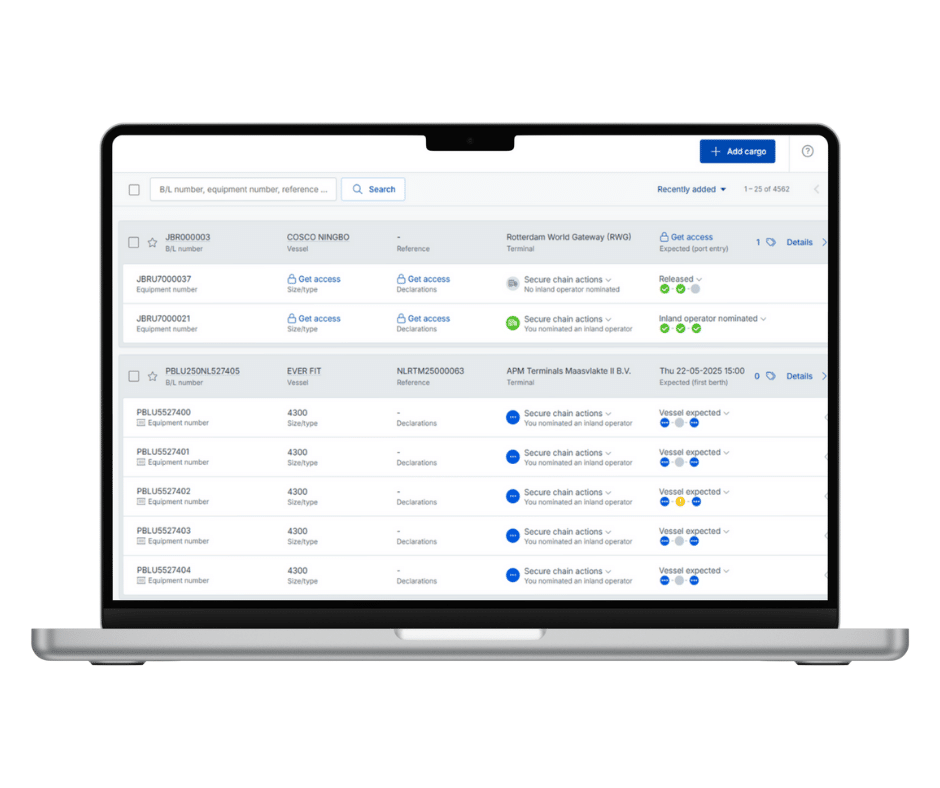
Milestones in Cargo Controller
In addition to the discharge time, Cargo Controller displays among other things the ETA, ATA, and gate-out time. This gives you complete insight into the status of your cargo.
You have access to full B/L information from the import manifest. This makes it possible to transfer the information directly to your import declaration, and will eliminate any discrepancies with Customs.
The NID notifications are integrated into Cargo Controller and will appear on the right side of the screen (see screenshots below).




Request a demo
Discover all benefits
One of our advisors Peter, Shara or Robin will be happy to guide you through Notification Import and Cargo Controller. They will tell you how to work more efficiently.
Frequently asked questions
Because you regularly use Notification Import Documentation. In Cargo Controller, you’ll see important milestones, including the (expected) discharge time.
If you use the Cargo Controller API, you can automatically submit your import documentation. Which saves you a lot of time.
Yes, that’s possible. This also allows you to build automatic triggers (together with your software supplier). One of the major advantages is that you no longer have to manually submit the NID notification in weekends and evenings. It will be sent automatically and at the right time.
Our advisors will be happy to tell you more about it.
Log in with your IAMconnected account and request the Cargo Controller service. Our specialists will ensure that the Notification Import Documentation is linked to the Cargo Controller.
Yes, this is possible. You’ll also need the service Transit Declaration for this. Log in with your IAMconnected credentials and request the service. Our specialists will ensure that the Transit Declaration is linked to the Cargo Controller.